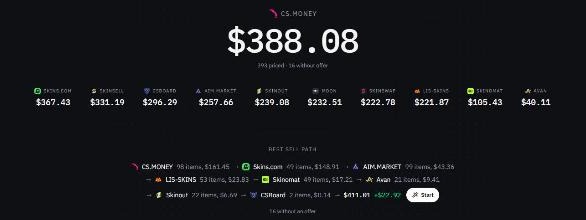
If your CS2 inventory is full of drops, trade-ups, and skins you no longer use, the offer is rarely the same on every instant-sell site. Sellboard puts those offers next to each item so you can see who pays more before you sell.
What Sellboard compares
CS2 skins are cosmetic finishes on weapons, knives, and gloves. They do not change how the game plays, but the cash price still moves with rarity, wear, pattern, and demand. An instant-sell site buys the item from you for a balance you can withdraw. Each site prices the same asset differently, and some will not buy it at all.
Players use a comparison like this when they want to:
- Cash out cases, stickers, and playskins without checking every site by hand.
- See which market pays more for a knife and which one pays more for the rest of the inventory.
- Skip items a site has marked as locked, overstocked, or not accepted.
- Add up only the skins they actually want to sell and pick the higher total.
How the prices get onto your desk
These markets do not publish a public price list for your own inventory. Sellboard reads the inventory you load from Steam, then the browser extension reads the offer each site shows you after you sign in.
- Paste a public Steam profile, vanity URL, or trade link and load the CS2 inventory.
- Open an instant-sell site, sign in, and let the extension send that site’s offers back.
- Repeat for the other markets. Each item keeps a price from every site that quoted it.
- Select what you want to sell. The summary shows each site’s total and highlights the best one.
Sellboard does not buy or hold skins. It only lines up the offers you already see on those sites. Prices change, and a site can refuse an item, so confirm the payout on the market before you sell.
© 2026 Sellboard. Not affiliated with Valve or the listed markets.
USDEnglish