
What Sellboard is
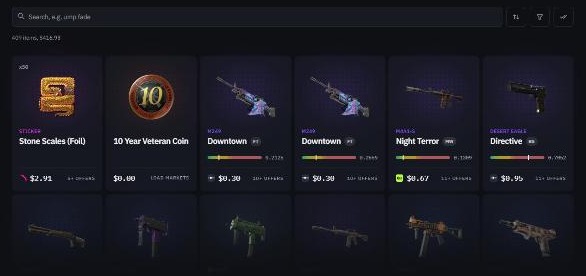
Sellboard is a comparison tool for CS2 instant-sell markets — the sites that buy your skins on the spot and pay you a balance you can withdraw. You load your Steam inventory, and Sellboard shows what each of 12 markets will pay for every item, side by side, plus the total for everything you select.
We specialise in one thing: cashing out. Sellboard can’t help you find a cheaper knife. It helps you get more when you sell the knife you already have.
Sellboard is not a market. It never buys, holds, or sells skins, and it never touches your money. You still sell on the market itself — Sellboard just tells you which one pays the most, item by item.
The website and the extension
Sellboard comes in two parts that work together:
- The website at sellboard.gg. Paste your Steam profile or trade link, load your CS2 inventory, and see every market’s offer next to each item.
- The browser extension for Chrome and Firefox. It brings each market’s sell prices onto the website.
Why an extension is needed at all
Instant-sell markets publish public APIs for their buy prices — what they charge you for a skin. They don’t publish what they would pay you for one. That number only exists inside your own session: when you open a market’s sell page, the site loads your inventory with its offer for each item.
So that’s where Sellboard picks it up. When you open the sell page on a supported market, the extension takes the one small response that holds your inventory and its sell prices, and passes it to the Sellboard tab. Do that on a few markets and every item on your board carries a price from each of them.
Is the extension safe?
A browser extension that runs on skin-trading sites is a fair thing to be suspicious of — that’s exactly how scam extensions steal accounts. Here is what Sellboard’s extension does and doesn’t do.
- It doesn’t handle login data. It never sees your Steam or market password, never reads cookies, and never signs in anywhere for you.
- It only reads inventory responses. On each market it watches for one specific request — the sell-inventory one — and ignores everything else on the page.
- It can’t move your skins. It doesn’t create trade offers, accept trades, or sell anything. Nothing leaves your inventory unless you do it yourself on the market.
- It’s reviewed by the stores. The Chrome Web Store and Firefox Add-ons review extensions before publishing them and have strict rules about data handling. Every permission the extension asks for is listed on its store page and shown before you install.
What you can do with it
1. Find the best instant-sell market for your inventory
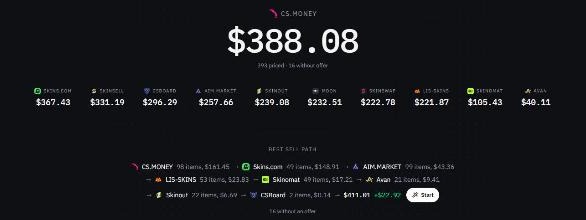
There are more than ten instant-sell markets, and they don’t agree on price. One pays more for knives, another for cases, a third won’t take your stickers at all. Checking each one by hand means signing in, opening the sell page, and noting prices item by item. Sellboard lines them all up in one view, so you can see in seconds which market pays the most for what you’re selling.
2. Sell your whole inventory with the best sell path
The best market for your inventory as a whole is rarely the best for every single item in it. The best sell path splits your selection across markets so each item goes to whoever pays most for it — in the example above, that’s an extra $22.97 over the best single market.
Press Start and a step-by-step guide walks you through it: which market to open, which items to sell there, and what you should expect to receive, one market at a time.
3. Spot arbitrage
Sometimes an instant-sell market pays more for a skin than it currently costs on a P2P market like CSFloat. When that happens you can buy on the P2P market and sell instantly for a profit. Sellboard shows you the instant-sell side of that comparison. Keep an eye on fees and on trade protection: a skin you just bought may be locked for days, and prices can move before you’re able to sell.
Sellboard vs P2P and instant-sell markets
P2P markets like CSFloat let you list a skin and wait for another player to buy it. You usually get the highest price this way, but it can take days, and some items never sell.
Instant-sell markets like LIS-SKINS buy the skin from you right away. You trade some of the price for speed, and how much you trade away depends heavily on which market you pick.
Sellboard is neither. It’s the layer on top of the instant-sell markets that makes sure that, if you’re selling instantly anyway, you’re doing it at the best rate on offer.
| P2P market (CSFloat) | Instant-sell market (LIS-SKINS) | Sellboard | |
|---|---|---|---|
| What it is | Marketplace between players | A site that buys your skin itself | A tool that compares instant-sell sites |
| How fast you get paid | When a buyer shows up | Instantly | Instantly — on the market you pick |
| Price you get | Highest, if you can wait | Lower — the speed costs a margin | The best instant price available |
| Holds your skins or money | Yes | Yes | Never |
| Helps you buy cheaper | Yes | Yes | No |
Sellboard vs “compare markets” websites
Search for “best site to sell CS2 skins” and you’ll find plenty of comparison pages. They list each market’s fees, reviews, the year and country it was founded, and its withdrawal options. That can be useful background — but it’s an information page, not a tool. It can’t tell you what any market will actually pay for your skins today.
Sellboard loads your actual inventory and shows live sell prices from each market, item by item, then works out how to sell all of it for the most money.
Getting started
- Install the extension from the Chrome Web Store or Firefox Add-ons.
- Open sellboard.gg and load your CS2 inventory with your Steam profile link or trade link.
- Open the sell page on each market you use. Their prices appear on your board as they load.
- Select the items you want to sell and compare totals, or press Start on the best sell path.
Prices change all the time and a market can refuse an item, so always check the final offer on the market before you confirm a sale.